Form 1098T (Tuition Statement)
Citrus College no longer mails 1098-T forms. Students may access their form online by January 31 of each year. Additionally, the prior year's form is also available on the website.
Accessing Your 1098-T
To access your 1098T, visit View your 1098-T IRS Form. Log in using the sign on window, select "Tax Notification," then choose the tax year and print your 1098T.
Sample 1098-T Form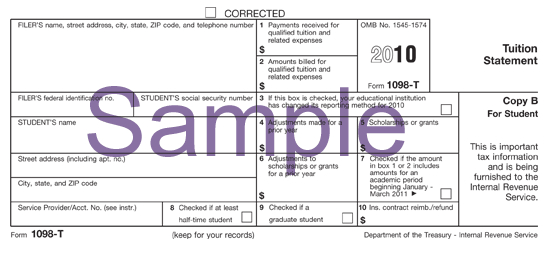
Commonly Asked Questions
An eligible educational institution such as a college or university in which you are enrolled and an insurer who makes reimbursements or refunds of qualified tuition and related expenses to you must furnish this statement to you.
You, or the person who can claim you as a dependent, may be able to claim an education credit on Form 1040 or 1040A, only for the qualified tuition and related expenses that were actually paid in 2025. To see if you qualify for the credit, see Pub. 970, Tax Benefits for Education, Form 8863, Education Credits and the Form 1040 instructions.
Student's identification number. For your protection, this form may show only the last four digits of your social security number (SSN), individual taxpayer identification number (ITIN) or adoption taxpayer identification number (ATIN). However, the issuer has reported your complete identification number to the IRS and, where applicable, to state and/or local governments.
Institutions report payments received during the calendar year in box 1. The amount shown in box 1 may represent an amount other than the amount actually paid in 2025. Your institution must include its name, address and information contact telephone number on this statement. It may also include contact information for a service provider. Although the filer or the service provider may be able to answer certain questions about the statement, do not contact the filer or the service provider for explanations of the requirements for (and how to figure) any education credit that you may claim.
Account number. May show an account or other unique number the filer assigned to distinguish your account.
Box 1: Shows the total payments received in 2025 from any source for qualified tuition and related expenses less any reimbursements or refunds made during 2025 that relate to those payments received during 2025.
Box 2: This box is reserved for future use.
Box 3: This box is reserved for future use.
Box 4: Shows any adjustment made for a prior year for qualified tuition and related expenses that were reported on a prior year Form 1098-T. This amount may reduce any allowable education credit that you claimed for the prior year (may result in an increase in tax liability for the year of the refund). See "recapture" in the index to Pub. 970 to report a reduction in your education credit or tuition and fees deduction.
Box 5: Shows the total of all scholarships or grants administered and processed by the eligible educational institution. The amount of scholarships or grants for the calendar year (including those not reported by the institution) may reduce the amount of the education credit you claim for the year.
Box 6: Shows adjustments to scholarships or grants for a prior year. This amount may affect the amount of any allowable tuition and fees deduction or education credit that you claimed for the prior year. You may have to file an amended income tax return (Form 1040X) for the prior year.
Box 7: Shows whether the amount in box 1 or 2 includes amounts for an academic period beginning January-March 2026. See Publication 970 for how to report these amounts.
Box 8: Shows whether you are considered to be carrying at least one-half the normal full-time workload for your course of study at the reporting institution. If you are at least a half-time student for at least one academic period that begins during the year, you meet one of the requirements for the American opportunity credit. You do not have to meet the workload requirement to qualify for the lifetime learning credit.
Box 9: Shows whether you are considered to be enrolled in a program leading to a graduate degree, graduate-level certificate or other recognized graduate-level educational credential.
Box 10: Shows the total amount of reimbursements or refunds of qualified tuition and related expenses made by an insurer. The amount of reimbursements or refunds for the calendar year may reduce the amount of any education credit you can claim for the year (may result in an increase in tax liability for the year of the refund).
To view a summary of all transactions posted to your account, review your student self service dashboard after you login.
Citrus College cannot adjust your 1098-T qualified payments to include transactions specifically excluded by the Hope Scholarship, American Opportunity and Lifetime Learning credit programs such as room and board.
Citrus College also cannot adjust your qualified payments to include transactions that took place in other calendar years. You must use your own records of payments in addition to the information about qualified charges Citrus College provides to determine your eligibility for a tax credit in any given calendar year.
In general, qualified tuition and related expenses are tuition and fees required for enrollment or attendance at an eligible educational institution. Qualified tuition and related expenses do not include:
- the cost of insurance,
- medical expenses (including student health fees),
- room and board,
- transportation or similar personal, living or family expenses, even if the fee must be paid to the institution as a condition of enrollment or attendance,
- expenses that relate to any course of instruction or other education that involves sports, games or hobbies or any noncredit course.
To access your 1098-T, visit View your 1098-T IRS Form.
Log in using the sign on window, select Tax Notification, then select the tax year and print your 1098-T.
Consult your tax advisor as to your particular eligibility for the credits.
For more detailed generic information, refer to IRS Publication 970 (Tax Benefits for Higher Education) or contact the IRS through their taxpayer assistance number at (800) 829-1040 or visit the IRS website.